
Publishing
Content is created and maintained in the Funny Little Shows system, then published to your website.
How it works
Section titled “How it works”When you’re making changes to Artists / Sessions / Rooms and event Pages in Funny Little Shows, these are all stored in the admin side of the system. None of those changes are live until they are published. Publishing can be manual, automatic or scheduled.
This allows you to make multiple changes and publish them as a set of changes, and of course “go live” when you want to, reviewing all the content with the team with live previews.
How to publish
Section titled “How to publish”- Click the Publishing left hand menu item and you’re taken to the dashboard
- You’ll see an overview which shows a count of any unpublished changes, any in progress and below that you’ll see a history of published changes
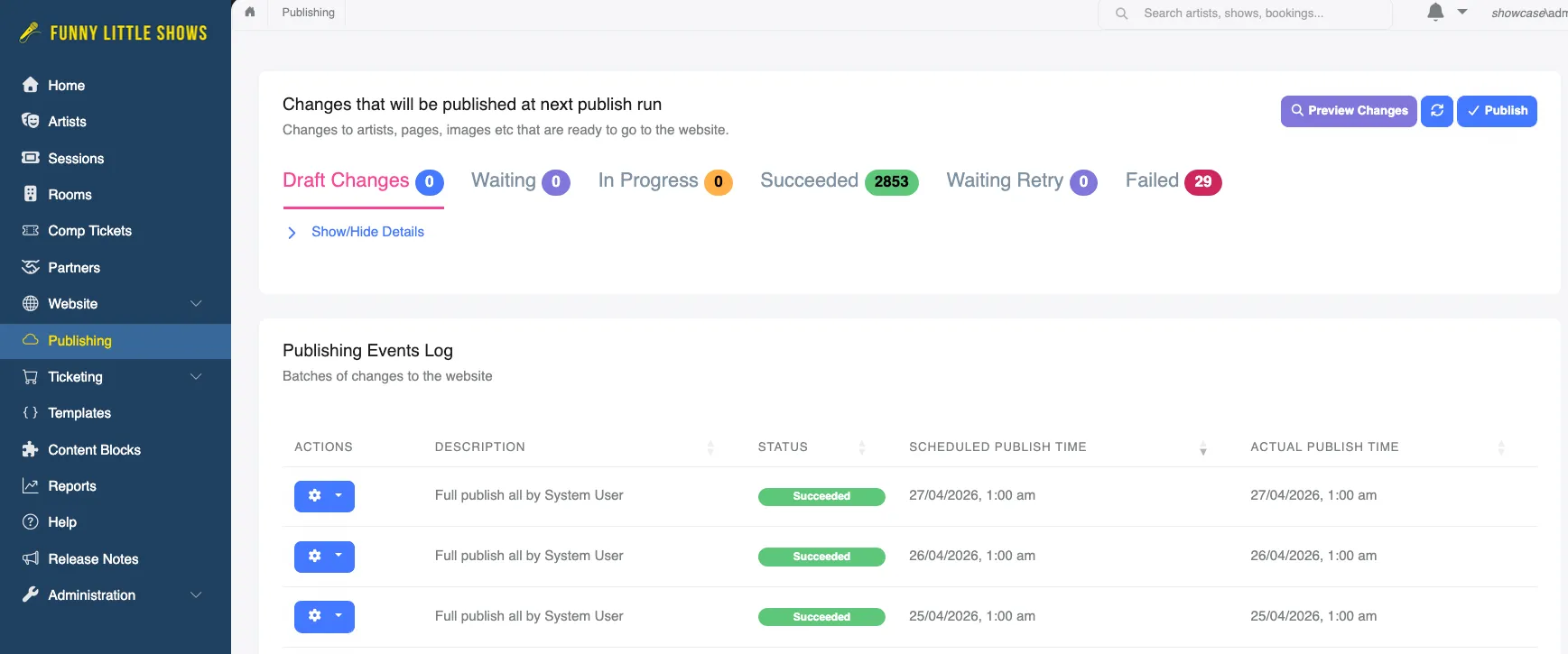
- When you are ready to publish your changes, or schedule a publish - click the Publish button at the top-right and you’ll see a dialog.
- In this dialog, you can choose the type of publish event: Quick | Full
- and when to Publish: Now | At (some future date / time)
Publish Types
Section titled “Publish Types”A Quick Publish will publish just the delta of any changes since the system last published to your website. A Full Publish will re-publish the whole website and can be used if there has been a change in images or slugs for Artists as an example.
Generally the Quick Publish is all that is needed.
When to Publish
Section titled “When to Publish”Now queues the publish job for immediate action - it can take 30-60 seconds for the changes to appear on your website. At allows you to schedule the publish for a future date / time. Note this will be in the timezone shown in the dialog and is determined by your system setting for default timezone.
Automatic delisting of Sessions, Artists
Section titled “Automatic delisting of Sessions, Artists”If enabled, the system will run a publishing job at 1am (2am in daylight savings time) that refreshes the landing page of your site, and Artists pages where Sessions are now in the past. This automatic delisting of shows means you don’t have to log on in the morning and update the website. Funny Little Shows takes care of it for you.
An Artist will appear on your landing page as long as they have at least one upcoming Session. Their individual page will be refreshed to only show future Sessions. Once all their Sessions are in the past, the Artist will no longer appear on the website landing page and will have their status set to Archived by the system.
If you don’t want this automation to occur you can simply turn off the setting in the Administration > Settings > Website Settings area.