
Ticket Categories
Each show can have one or more ticket category for sale. Common examples are Full, Student, Early-Bird. In addition, you can define Comp Tickets (i.e. free) that you manage for VIP access to performances.
Adding ticket categories to a session
Section titled “Adding ticket categories to a session”- Open the Pricing tab for a session.
- Expand the Ticket Categories & Custom Questions collapisble section at the top of the tab.
- Click New Category.
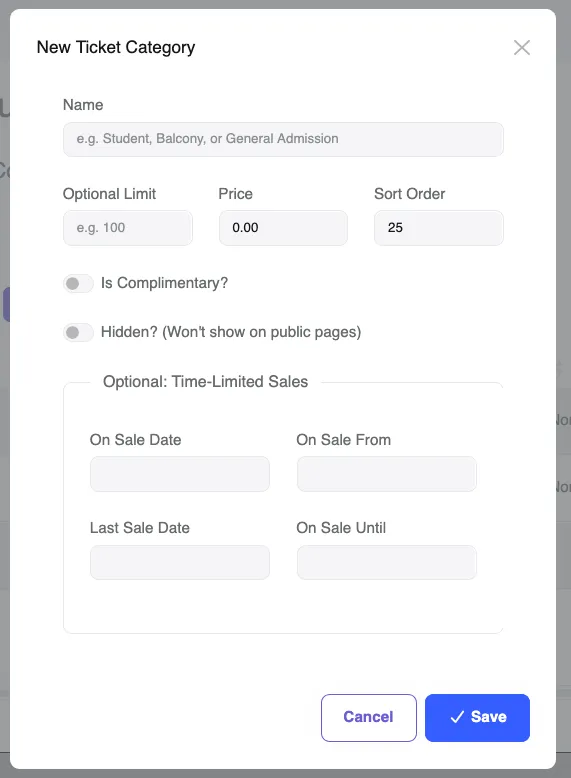
- Fill in:
- Name (e.g. General Admission)
- Price
- Click Save.
- Repeat for each category.
Ticket category options
Section titled “Ticket category options”| Field | Description |
|---|---|
| Name | Displayed to customers at checkout |
| Price | Face value including any applicable tax. Ticket fees added at checkout. |
| Optional Limit | Optional per-category cap (e.g. limit VIP to 20 seats) |
| Sort Order | Helps control the order of the categories at the checkout. |
| Is Complimentary? | See manage comp tickets |
| Hidden? | Not visible to public, can be used for short-term temporary sales |
| Time-Limited Sales | Optional fields for time-bound sales of this category, e.g. an early bird special |
Setting prices
Section titled “Setting prices”When you set the price for a Ticket Category, this is the price you would expect the punter to pay before ticket fees are added. If you are enabled for GST, it’s GST inclusive. Platform fees charged by Funny Little Shows to you the promoter are deducated from this amount. The system will show you the breakdown. See the example below where the promoter wants to set the price for $30.
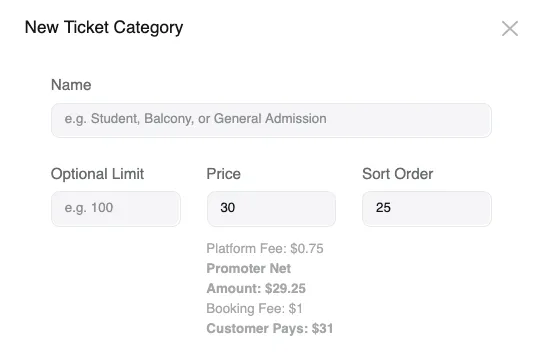
The promoter nets $29.25 per ticket of this category when setting the price of $30, due to the 2.5% platform processing fee charged by Funny Little Shows. The punter pays $31 per ticket for this category. This is broken down and displayed during the checkout process.
Pricing templates
Section titled “Pricing templates”If you run similarly priced shows repeatedly, you can save a set of ticket categories as a Pricing Template and apply it to new shows in one click. From this Pricing tab, click the Save Template button to create a new template. Or view and manage existing pricing templates under the left-hand menu Ticketing → Pricing Templates. See Pricing Templates for more information.